

Appearance
Blocks
Ink Player ships four native Gutenberg blocks so you can place a player or a playlist directly in the WordPress editor — no shortcode required.
The four blocks
| Block | What it places |
|---|---|
| Ink Player | A single video |
| Ink Audio Player | A single audio track |
| Ink Playlist | A video playlist |
| Ink Audio Playlist | An audio playlist |
Adding a block
- In the WordPress editor, click the + (Add block) button.
- Search for Ink Player (or one of the other three block names) and insert it.
- The block shows a placeholder where you pick an existing media item or paste a source URL.
- Once a source is chosen, the player renders in the editor.
TIP
You can paste a source directly into the placeholder — a YouTube link, a Vimeo link, a direct MP4, an HLS .m3u8, or a DASH .mpd. See Providers for everything that is supported.
Configuring a block
Select the block and open the inspector (the settings sidebar on the right). The inspector groups its options into config panels so you can adjust playback and appearance for that placement.
For a full panel-by-panel explanation of the video inspector, see Video inspector panels. It covers Basic Settings, Popup, Appearance, Overlays, Ads, Presets, Chapters, Captions, Multi-Language, Global Branding, Timestamp, and Who can watch.
Draft and published
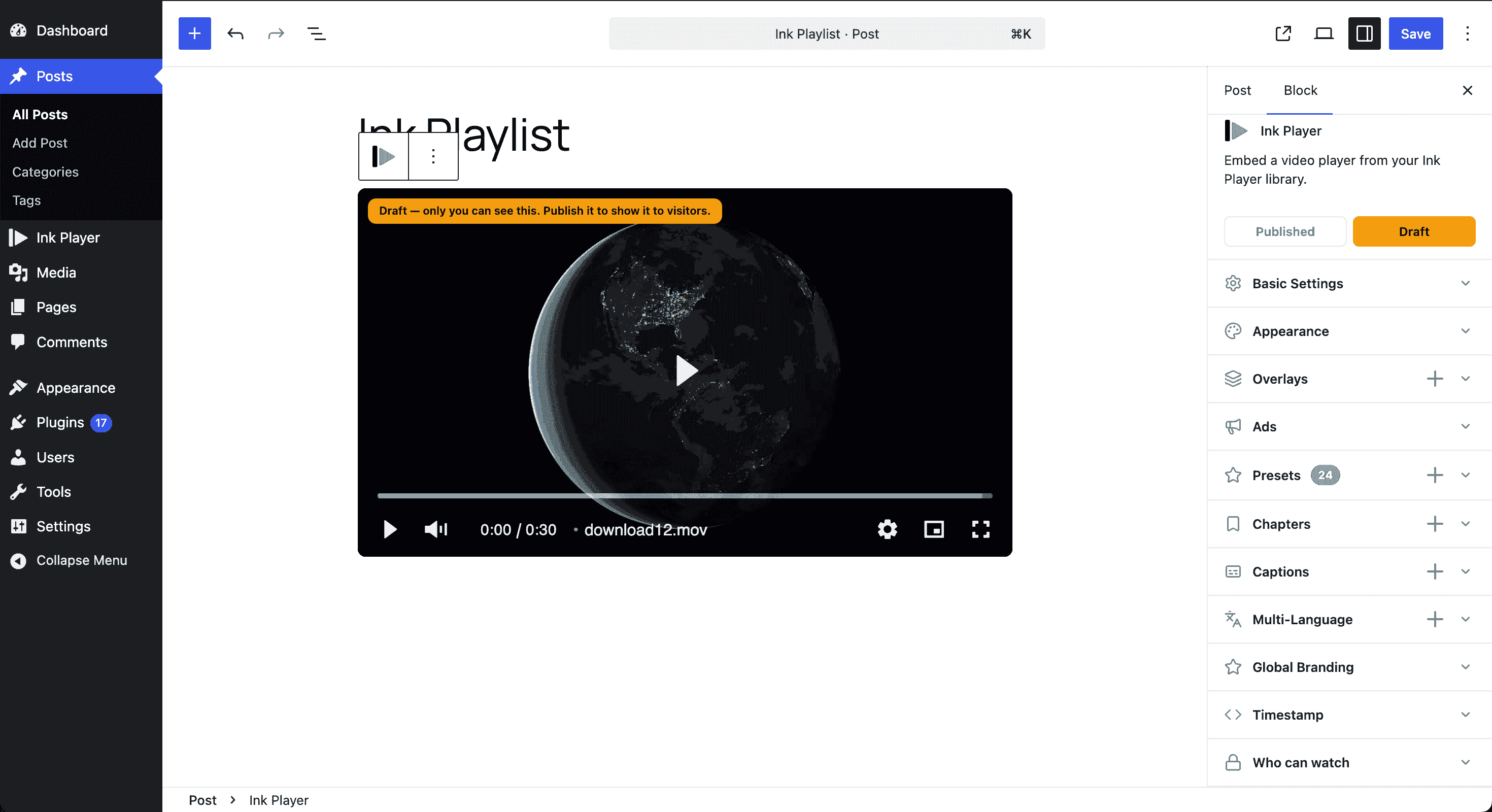
Pinned to the top of the inspector — directly under the block card, above the config panels — is a segmented Published / Draft control. It sets the block's status, which is applied to the linked media or playlist record when you save the post.
While a block is set to Draft, the editor preview shows the player with an amber badge over its top-left corner reading "Draft — only you can see this. Publish it to show it to visitors." Public visitors see nothing at all; signed-in admins and managers still see the player and badge. Switch the control to Published to make it visible to everyone.
INFO
Status lives on the underlying record, so changing it here also changes it for the media or playlist everywhere it is placed. See Access control for how draft differs from who can watch.
Switching block type
Each block shows cross-promo chips that let you switch to a related block type — for example, swap an Ink Player for an Ink Playlist — without removing and re-adding a block.
Blocks stay in sync
Blocks render from the saved media record by its uid. That means any edit you make to the media item in the dashboard editor — a new title, a different source, updated branding, or a change to who can watch — propagates automatically to every block where that media is placed.
INFO
Because every placement points back to the same media record, you never have to update blocks one by one. Edit once in the dashboard and you are done.
Blocks vs. shortcodes
Blocks are the visual way to place media in the block editor. If you are working in a classic editor, a widget, or a template, use a shortcode instead — both render from the same media record.