

Appearance
Overlays
Overlays are timed elements that appear on top of the player — a call to action, a watermark, an email form, a clickable hotspot, a banner, a WordPress shortcode, and more. You can place any number of overlays on a video and control exactly where and when each one shows.
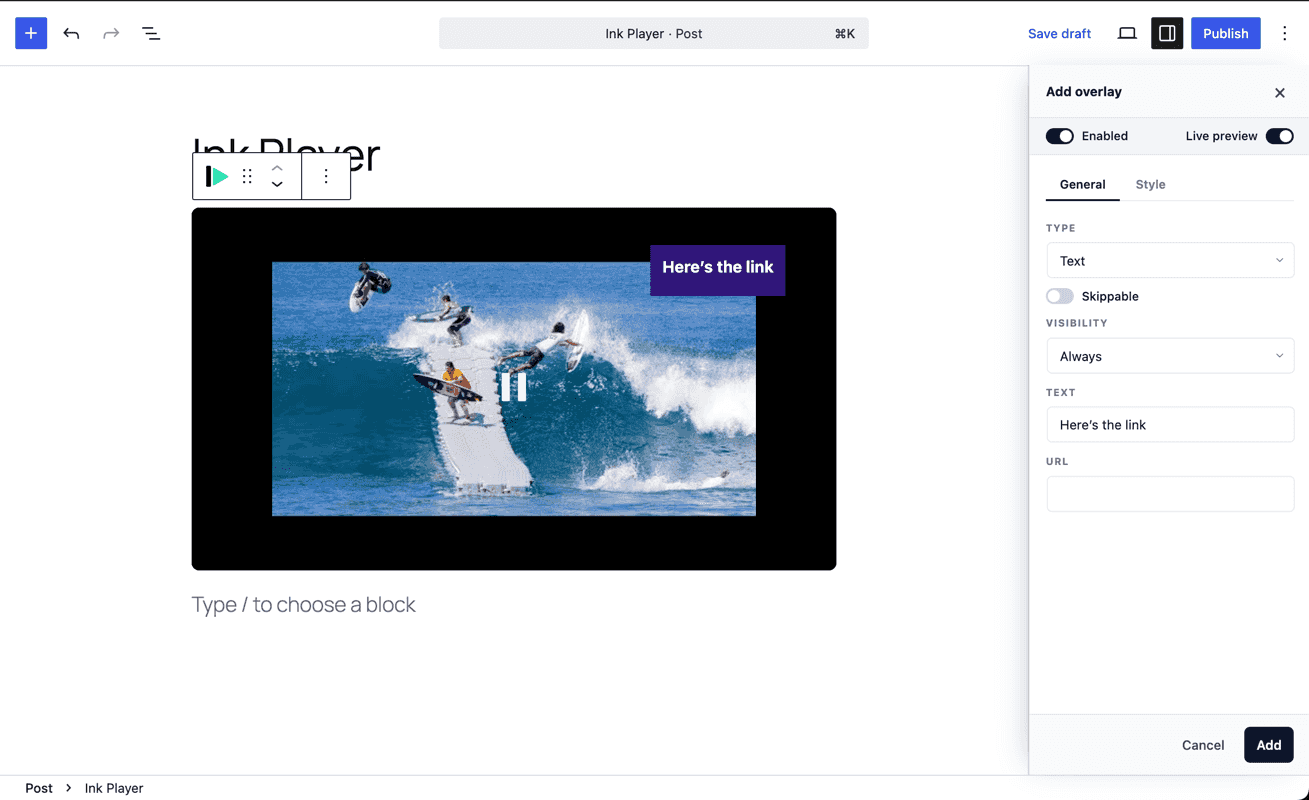
Where to configure overlays
Overlays live in the Overlays panel of the player configuration:
- In the Gutenberg block inspector, or
- In the dashboard Media (or preset) editor inspector.
Open the panel, add an overlay, pick its type, and a drawer opens with that overlay's options and a live preview. Because overlays are part of the player config, they can also be saved into a reusable preset.
Overlay types
| Type | What it does |
|---|---|
| Text | A simple text note or label on the player. |
| CTA | A call-to-action card with a headline and a linked button. |
| Action bar | A bar of buttons, typically pinned along the bottom of the player. |
| Email capture | A form that collects email addresses — submissions are saved as Leads. |
| Watermark | A small logo or text mark; can auto-move around the frame to deter screen capture. |
| Image / Banner | A clickable image (such as a banner ad) with a link, alt text, width, and an optional Ad badge. |
| Hotspot | A clickable marker placed anywhere on the frame. On click it opens a link, seeks to a time, or pauses. |
| Shortcode | Renders any WordPress shortcode on top of the player, using normal WordPress server-side shortcode rendering. |
| Custom | Your own custom HTML. |
Positioning
Every overlay is positioned freely on the frame.
- Placement presets — nine quick anchors (the corners, the edges, and center).
- Custom — choose Custom placement to reveal horizontal and vertical sliders and drop the overlay at any exact point.
Layout-style overlays (the action bar, email capture, and CTA) pin themselves sensibly — for example the action bar spans the bottom — while point-style overlays (text, watermark, hotspot, image) sit exactly where you place them.
Timing
Each overlay controls when it appears:
- Always — visible for the whole video.
- Playing — visible only while playback is active.
- Paused — visible when playback is paused.
- After a percentage — appears once playback passes a percentage of the video's length.
- Percentage range — visible between two percentage points.
- Time range — visible only between a start and end time.
Most overlays can also be made skippable so viewers can dismiss them.
Styling
Depending on the type, you can adjust colors (text, background, button), opacity, padding, corner radius, font size, and stacking order (z-index) — all from the overlay's drawer, with the live preview reflecting changes as you make them.
Email capture & leads
The Email capture overlay turns the player into a lead magnet: gate or interrupt playback with a short form, and every submission is stored on the Leads page. You can choose what happens after a viewer submits — continue playback, or simply hide the form.
Shortcode overlays
The Shortcode overlay is for WordPress plugin output that needs PHP rendering, normal page CSS, JavaScript, and AJAX behavior. Add the shortcode, pick its placement, and decide when it appears. Ink Player renders the shortcode during the page request and keeps the overlay hidden until the timing rule is met.
Good uses:
- Contact, opt-in, or survey forms.
- Paginated tables and directories.
- Booking widgets or event lists.
- Quizzes, membership widgets, or LMS snippets.
TIP
For shortcode output with large datasets, rely on the shortcode plugin's own pagination or AJAX loading. Ink Player controls when the overlay appears; the shortcode plugin should still control how much data it loads.
Banners & ad overlays
The Image / Banner overlay is ideal for sponsor banners or house ads: pick an image, give it a click-through link, set its width, and optionally show a small Ad badge in the corner. For full interruptive video ads (pre-roll, mid-roll, post-roll), see Ads instead.
TIP
Overlays render identically wherever the media is placed — block, shortcode, or page builder — because they're saved on the media record. Configure once, and every placement shows them.