

Appearance
Providers
Ink Player uses one consistent player for every source. Whether your media is self-hosted, on YouTube, or on a streaming platform, viewers get the same player UI. This page lists every supported source type and how to add each one.
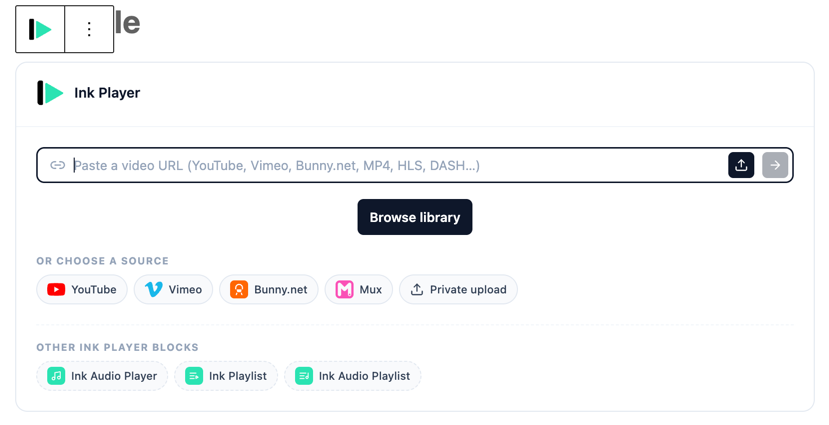
Supported sources
| Source | Type | What it is | How to add |
|---|---|---|---|
| Local | Self-hosted | A file uploaded to your WordPress site | Select from the WordPress media library, or use Private upload |
| Remote | Direct URL | Any direct link — MP4, HLS .m3u8, DASH .mpd, or audio such as MP3 | Paste the URL |
| YouTube | Platform | A YouTube video | Paste the YouTube URL, or choose the YouTube source |
| Vimeo | Platform | A Vimeo video | Paste the Vimeo URL, or choose the Vimeo source |
| Bunny.net Stream | Streaming | Video hosted on Bunny.net Stream | Choose the Bunny.net source |
| Bunny Storage | Storage | A file on Bunny.net's classic storage | Choose the Bunny Storage source |
| Mux | Streaming | Video hosted on Mux | Choose the Mux source |
| Cloudflare Stream | Streaming | Video hosted on Cloudflare Stream (adaptive HLS) | Choose the Cloudflare Stream source |
| Cloudflare R2 | Storage | A file in a Cloudflare R2 bucket | Choose the Cloudflare R2 source |
Three ways to add media
When you click Add media in Media, you can:
- Paste a URL — Ink Player detects the source type automatically. This covers direct files (MP4, HLS, DASH, audio) and platform links (YouTube, Vimeo).
- Select from the WordPress media library — pick a file you have already uploaded to WordPress.
- Choose a source — YouTube, Vimeo, Bunny.net, Mux, or Private upload.
TIP
Pasting is usually the quickest path. For platform links, just paste the page URL — for direct files, paste the link that ends in .mp4, .m3u8, .mpd, or your audio extension.
Format support at a glance
- Video files: MP4
- Adaptive streaming: HLS (
.m3u8) and DASH (.mpd) - Audio: MP3 and other common audio formats
- Platforms: YouTube, Vimeo
- Streaming/storage services: Bunny.net Stream, Bunny Storage, Mux, Cloudflare Stream, and Cloudflare R2
Provider integrations
Some sources are configured under Settings → Integrations, where you connect services such as Bunny.net, Mux, Cloudflare Stream, and Cloudflare R2.
Multi-language sources
Multi-language video uses the same source types as normal playback. Each language version is another playable source URL, so you can use direct files, HLS, Bunny.net, Mux, or other supported video sources for each spoken-language version.
For best results, keep every language version aligned to the same edit and duration. See Multi-language video.
Access and providers
Not every source can be truly access-protected. Bunny.net, Mux, Cloudflare Stream, Cloudflare R2, and protected (private) uploads support enforced access control and signed playback, while public WordPress media URLs and platform embeds (YouTube/Vimeo) cannot be. See Access control for the full picture.