

Appearance
Playlists
A playlist (/playlists) is an ordered collection of media items of a single type — either video or audio. Playlists reuse the same media records as the Media library, so any edit to a media item is reflected wherever the playlist appears.
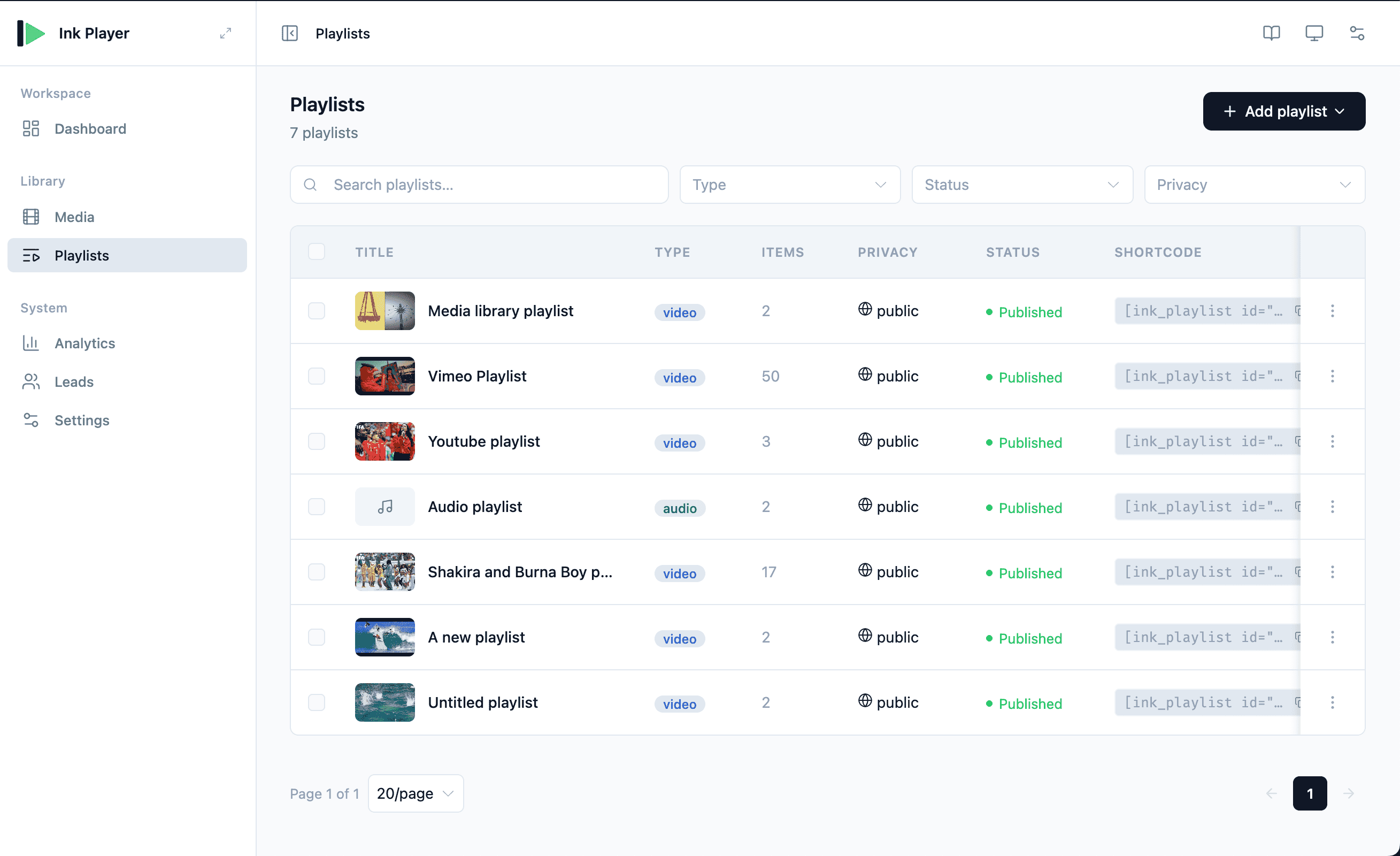
Creating a playlist
- On the Playlists page, click Add playlist.
- Choose Video playlist or Audio playlist.
- Add items by either:
- Picking from the library — the picker supports search and infinite scroll
- Importing a URL — paste a YouTube or Vimeo playlist/channel URL
The playlist editor
The editor lets you shape both the contents and the player:
- Reorder items — move items up or down
- Remove items from the collection
- Configure playback — Auto-play next, Shuffle, and Repeat
- Choose a layout — List, Grid, or Slider (audio playlists use the List layout only)
- Set access control — who can watch the playlist
See Playlist editor for the complete creation, import, ordering, and publishing workflow. See Playlist layouts for layout guidance.
For viewer restrictions, see Access control.
The playlists table
The table mirrors the Media library:
| Column | What it shows |
|---|---|
| Title | Playlist name |
| Type | Video or audio |
| Items | Number of items in the playlist |
| Privacy | Access level — Public or Private |
| Status | Published (visible to visitors) or Draft (visible only to you) |
| Shortcode | A copyable [ink_playlist id="N"] |
| Created | When the playlist was added |
Row actions and filters
The ⋮ row menu offers Preview, Edit, Share / Embed, Duplicate, and Delete — the same actions as the Media library. Use the search box and filters to narrow the list.
Draft and published playlists
Like media, every playlist is either published or a draft. The Playlist Editor footer has Save as draft and Publish buttons.
- Drafts are hidden from public visitors entirely. As an admin you still see the playlist player plus an amber badge: "Draft — only you can see this. Publish it to show it to visitors."
- Published playlists are visible to everyone, subject to the playlist's access setting.
Both footer buttons stay disabled until you add at least one item — an empty playlist cannot be saved.
Public or Private only
A playlist's access is Public or Private — there is no per-playlist Password mode (unlike individual media). A private playlist is shown to logged-in members only and gates the whole collection before any track loads.
Embedding a playlist
Use the shortcode:
text
[ink_playlist id="N"]Replace N with the playlist's ID, copied from the Shortcode column.
You can also insert a playlist with the block editor:
- Ink Playlist block
- Ink Audio Playlist block
TIP
Importing a YouTube or Vimeo playlist or channel URL is the fastest way to build a large playlist without adding each item by hand.
Related
- Media — manage the individual items a playlist contains
- Playlist editor — complete playlist editing workflow
- Playlist layouts — choose how the playlist appears
- Analytics — track views and watch time
- Presets — reuse a player configuration