

Appearance
Presets
Presets are reusable player-configuration bundles — layout/skin, controls, behaviors, overlays, and branding overrides. On this page you choose which preset new media items start with.
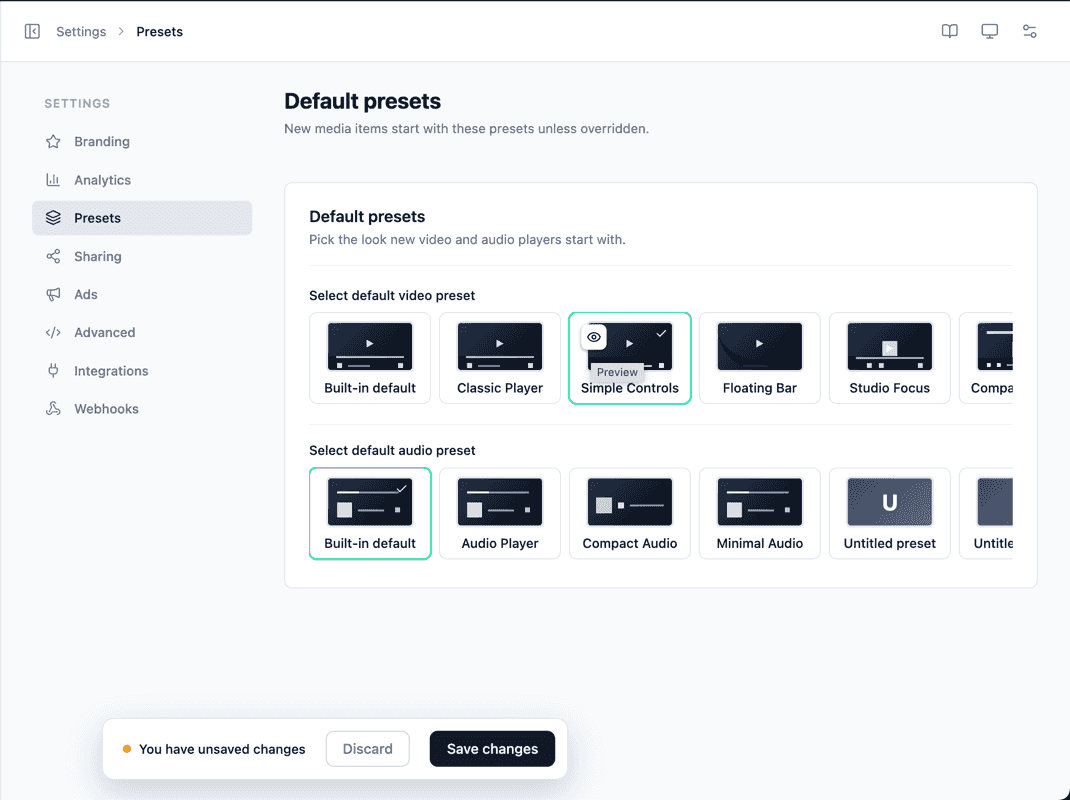
Default presets
Pick a default Video preset and a default Audio preset. These apply only to media you create from now on — existing media keep whatever preset they already use.
Each choice is shown as a horizontally scrollable row of preset tiles:
- A Built-in default tile.
- Each of your custom presets.
Previewing a preset
Every tile has a Preview (eye) icon:
- Click the eye icon on a tile.
- A live player modal opens, rendering that preset against sample media — with your global branding applied.
- To preview the preset on your own content, paste any media URL into the modal.
TIP
Use Preview before setting a default so you can see exactly how the controls, skin, and branding come together.
Creating and editing presets
You build and edit presets from the Presets panel inside the media/playlist editor inspector — open a media item or playlist and find the Presets panel in the inspector. The default presets you select here are then chosen from that same set of reusable bundles.
INFO
Remember to Save from the Save bar at the bottom of the page after changing your defaults.